For writers leaving Sudowrite
Bring your book over in one upload.
Drop your Sudowrite export and your Story Bible CSVs into KudoNovel. Chapters stay chapters, your characters and world land in the Bible, and not a line is rewritten. Then write on, with credits you buy once instead of a monthly plan.
Sign up free, no cardThe import is freeCredits never expire
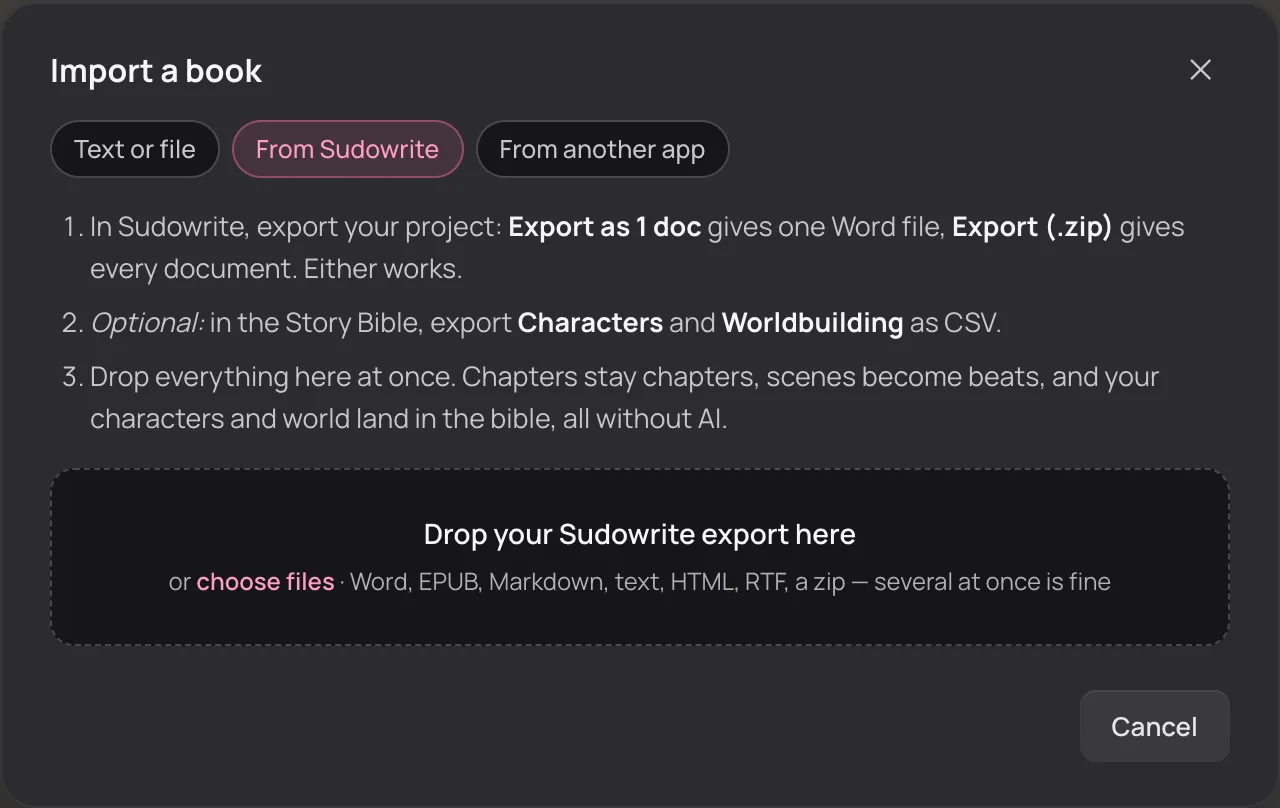
Out of Sudowrite in three steps
- 1
Export your book.In Sudowrite, Export as 1 doc gives one Word file and Export (.zip) gives every document. Either works. (Sudowrite’s export help)
- 2
Export your Story Bible. optionalIn the Story Bible, export Characters and Worldbuilding as CSV.
- 3
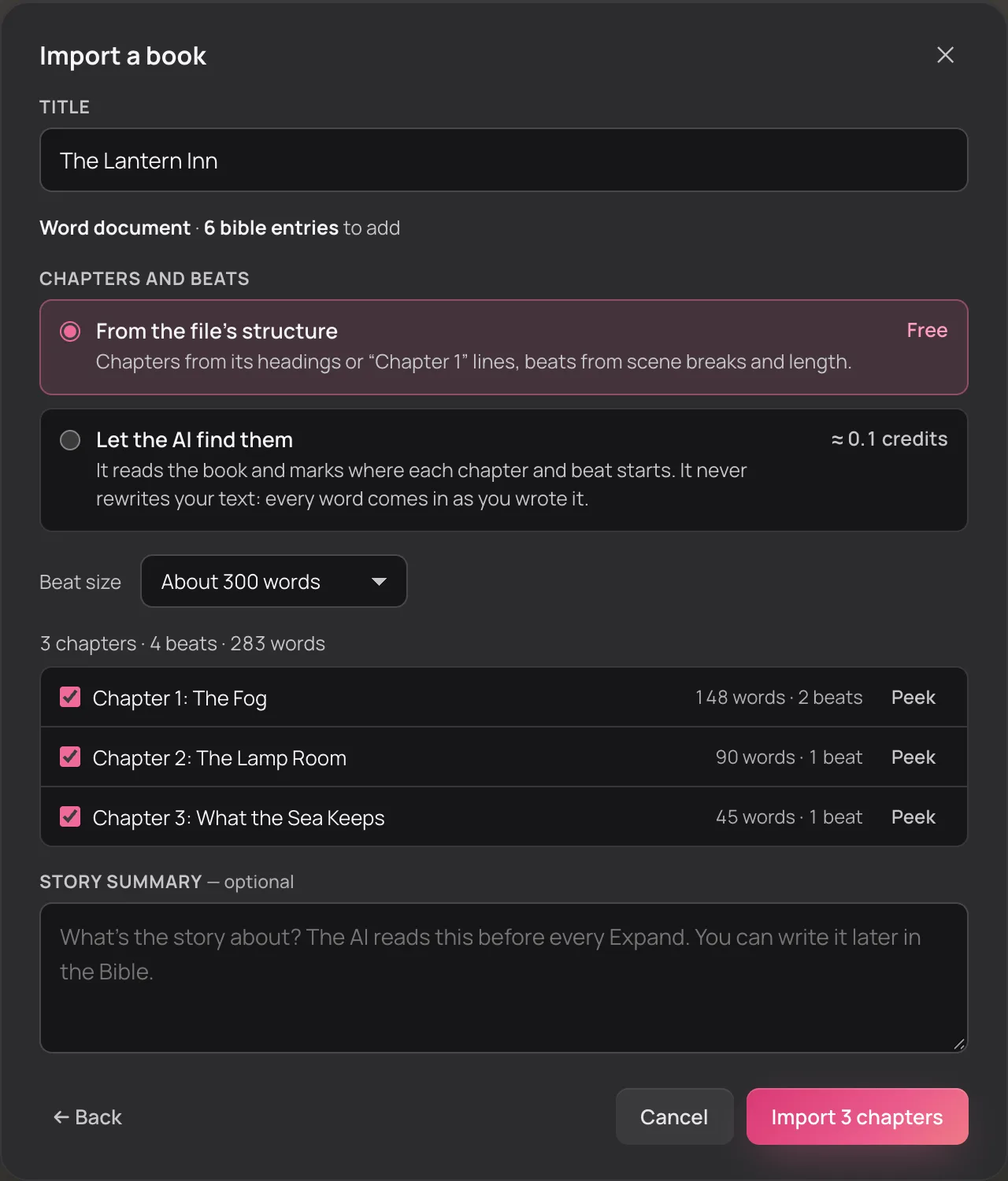
Drop everything in at once.Sign up free, and Import opens on From Sudowrite. Check the chapters in the preview, then press Import.
Every Sudowrite tool, and where it lives now
The names change; the moves don't. Here's what you'll reach for in KudoNovel instead.
-
SudowriteWrite
Suggest
On an empty paragraph, Suggest offers three ways on: Close (stay in the moment), Progress (the next step) and Twist (unexpected, never breaking a fact you set). Pick one or reroll.
-
SudowriteRewrite
Steer
One line — “make her colder”, “cut the backstory” — edits the paragraph in place, or only the part you highlight. Your steer outranks everything else.
-
SudowriteExpand
Expand
Type the beat rough and Expand writes it out into prose from your own words, keeping your events and adding around them.
-
SudowriteDescribe
Steer with your own ask
Type what you want to see — “describe the kitchen through her eyes” — and Steer works it into the paragraph instead of handing you a list to paste.
-
SudowriteStory Bible
The Bible, which fills itself in automatic
Characters, places, items and events fill in from what you write, with a running summary of the whole book. No cards to update after every chapter; an entry you wrote or edited is never rewritten by the AI.
-
SudowriteSaliency Engine
The entry pick
Before it writes, KudoNovel picks the Bible entries the paragraph needs (people are never missed) and reads the chapters before it.
-
SudowriteBrainstorm
Ask your Bible
Ask for a name, a twist or what could happen next, and get two or three ideas that fit what your book has already established.
-
SudowriteChat
The KudoAI agent
Chat with KudoAI and it works the app for you, on screen: chapters, paragraphs, Bible entries. Every action can be undone. Runs on purchased credits.
-
SudowriteHistory
Undo, History and Versions
Every change the AI makes is a version. Undo and Redo walk the whole page; Versions shows one paragraph’s map and brings any of it back.
-
SudowriteExport
Export
Plain text, Markdown, a single HTML page, EPUB 3 or PDF, any time.
-
SudowriteFinding readers
Community Books extra
Publish chapters free to a public library. Readers read, comment, give kudos and download the EPUB.
Why writers leave Sudowrite for KudoNovel
- The bill. On Sudowrite's two cheaper plans, unused credits expire every month, and a credit has no fixed size: what a request costs depends on the model. KudoNovel's credits never expire, and a paragraph Expanded is roughly one.
- The Bible. Sudowrite's Story Bible is cards you keep up as the book changes. KudoNovel's fills itself in from what you write, and never rewrites an entry you wrote.
- Adult fiction. The only mode Sudowrite's docs ever called “Unfiltered” is retired. KudoNovel has no filter of its own to switch on.
- Your phone. Sudowrite's mobile app is a separate install. KudoNovel is the same app in any browser, and adds to your home screen to open full screen.
Want the full head-to-head? Our Sudowrite alternative guide goes deeper, and the features, in screenshots, show the app itself.
Credits that reset, or credits that stay
On Sudowrite's two cheaper plans, the credits you don't spend by the end of the month expire at the refresh. In KudoNovel there's no month: you buy a pack, and it lasts until you've used it.
Sudowrite
A subscription, monthly or annual
| Plan | A month, billed yearly | Billed monthly |
|---|---|---|
| Hobby & Student225,000 credits a month | $10 | $19 |
| Professional1,000,000 credits a month | $22 | $29 |
| Max2,000,000 credits a month, rollover up to 12 months | $44 | $59 |
- Unused credits expire each month (rollover on Max only)
- A credit isn't a fixed number of words: it depends on the model
From Sudowrite's pricing page and help pages, checked November 2026.
KudoNovel
One-off packs, no subscription
- $3.50100 creditsabout a short novel
- $7.50500 creditsabout a full book
- $12.501,000 creditsa polished, well-revised book
- Credits never expire, and a month you don't write costs nothing
- A paragraph Expanded, with the Bible keeping up, is roughly 1 credit
- 1 free credit when you sign up, to try it
Prices in USD, paid through Stripe. See pricing
A year of Sudowrite's cheapest plan is $120 billed yearly, or $228 month to month. A full book in KudoNovel is a $7.50 pack, and the months you don't write are free.
Questions before you move
Will my formatting survive the import?
Yes. Italics and bold come over, headings become chapters, and scene breaks stay scene breaks. Your prose comes in word for word: the import cuts it into chapters and paragraphs by code and never rewrites a line. You see every chapter in a preview before anything is made, and the free split costs nothing. For a file whose chapters it can't see, there's an optional AI split, priced before you click.
Is my Story Bible imported?
Yes, from the CSV files Sudowrite's Story Bible exports. Each character (with their other names, personality, background, looks, dialogue style and your custom traits) and each worldbuilding element becomes a Bible entry. The Outline CSV is chapter summaries, which have no place in the Bible, so it is skipped. From there the Bible keeps up with what you write next; to have it read the whole imported book as well, press Rescan in the Bible (that spends credits).
Is there a subscription?
No. You get 1 free credit when you sign up and confirm your email, then buy a credit pack when you want more: $3.50 for 100 credits, $7.50 for 500 or $12.50 for 1,000. Credits are a balance you draw down, not a monthly allowance: they never expire, and a month you don't write costs nothing. See pricing.
Can I write adult fiction?
Yes. KudoNovel has no content filter of its own: romance, horror, dark and explicit themes are your call, within the law. The AI model's own behaviour still applies, and KudoAI is chosen partly because it rarely refuses. Explicit books can be published to Community Books too, behind an “I'm 18 or older” notice.
Does the import cost anything?
No. Reading your files, finding the chapters and scene breaks and filling the Bible from your CSVs is free. Only the optional AI split costs credits, and its price is shown before you press it.
Can I use it on my phone?
Yes, in any modern browser, a phone's included. There's no app-store app, but on a phone you can add KudoNovel to the home screen and it opens full screen like an app. Your book saves to your account as you type, so what you wrote on the laptop is already there.
Your book, your Bible, no monthly bill.
Sign up free, drop in your Sudowrite export, and write your next chapter tonight.
Import my Sudowrite book