kNewsroom /Design · Nov 20, 2026
Press release

The best design is the one you can’t see.

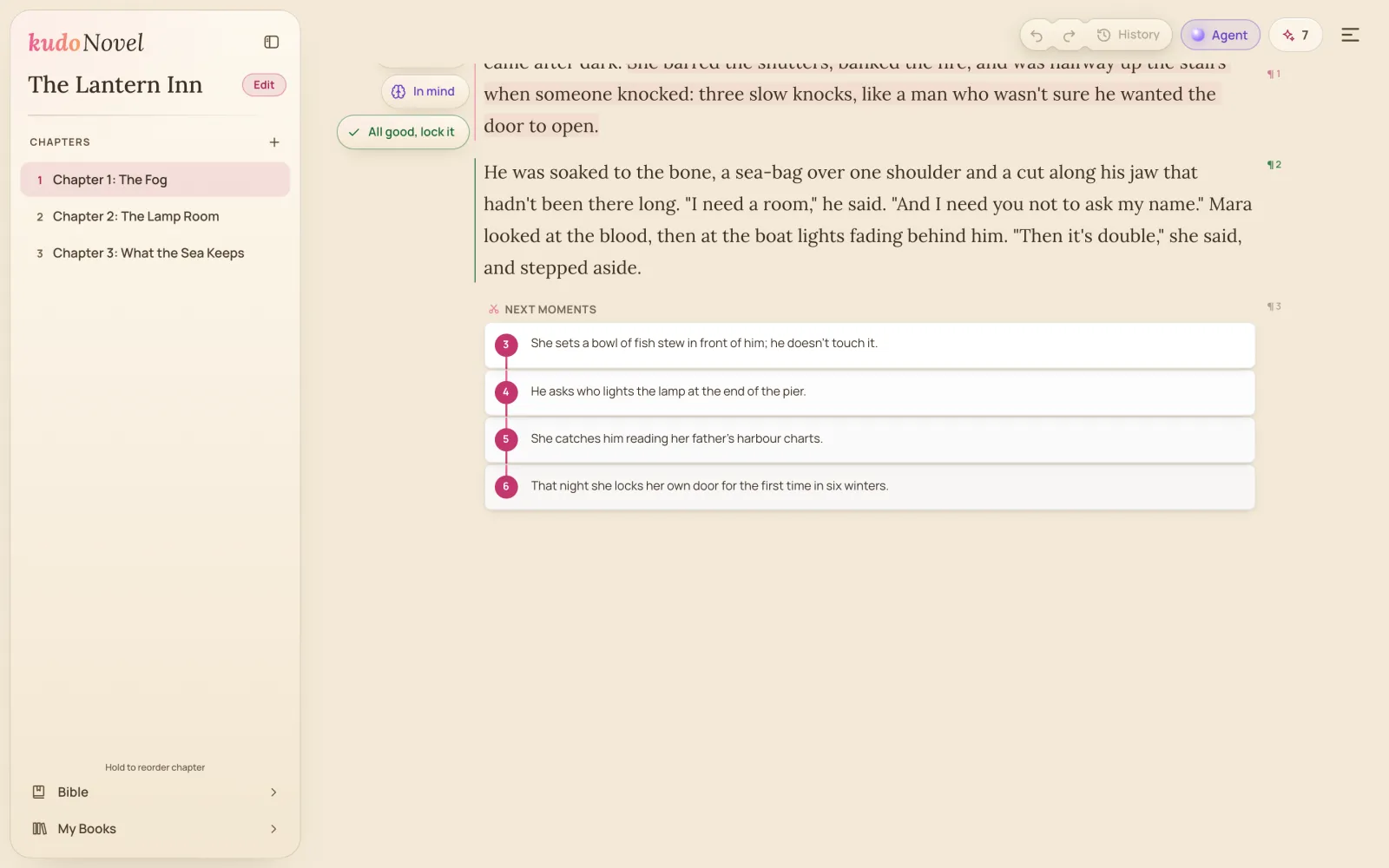
Simplicity at its best. Instead of putting everything in your face, KudoNovel keeps the editor as simple and clean as it can be, with the buttons you need right there, beside the paragraph you’re writing. Nothing else.

The KudoNovel page on Paper: a chapter of paragraphs, In mind and All good, lock it in the margin beside the paragraph in hand, Undo, Redo and History at the top, and the next moments waiting as numbered cards
The real app. Your words fill the page. The few buttons you need sit beside the paragraph you’re on, and nowhere else.
Simplicity at its best

Your story in front. Everything else out of the way.

Most writing apps put every feature on screen at once. We took the opposite road: the cleanest editor we could build, where the tools appear exactly when and where you need them.

01

Just a page

Open the app and you’re in your chapter. No dashboard, no panels, no prompt box. Type a rough line or a finished passage: the page is the book.

02

Right there, when you need it

The buttons show beside the paragraph you’re writing, and only there. No hunting through menus: what you need is one tap from your words.

03

Colour-coded, learned in 5 seconds

Every button has its colour, so you know what it does at a glance. Pink grows, orange changes, purple suggests, green locks.

ExpandSteerSuggestLock
04

Easy on the eyes

Paper, Sepia or Night, your text size, serif or sans. Made for long writing sessions, on any screen.

Built around you

An editor that fits how you write

Simple doesn’t mean limited. Three things that make KudoNovel yours.

1Make it yours

The editor fits your creativity. Not the other way round.

Every writer has their own habits: more banter, a tighter POV, their own spelling. Steer changes a paragraph with one line, “make her colder”, and its quick buttons do the usual edits in one tap: Lengthen, Tighten, Heat.

With Customize, your habits become buttons. Write an instruction once, “More banter”, “Her POV only”, “British spelling”, pick an icon, and it’s a button. Leave the name blank and KudoAI names it. Keep up to five on the row, on every book and every device.

Where: press Steer beside any written paragraph, then Customize at the end of the row.
2Brainstorm

Like talking to a friend. Just chat away.

Open the Bible, press Ask and talk about your story the way you would with a friend who has read every page. No prompts to craft, no rules: just chat.

“What could his secret be?” gets ideas that fit what you’ve already written. “What did Tomas tell her in chapter 2?” gets the answer. Tell it where the story is going and it asks what you haven’t decided yet. What you settle on becomes a Bible change you Apply or Skip, so the conversation turns into your story’s memory.

Where: open Bible in the sidebar and press Ask, the glowing orb beside the search. Works on the free credit too.
3Undo, done right

Try every idea. Lose nothing.

Undo is essential in writing, and we think we finally got it right. Writing is trying: a darker ending, a different first line, the scene from her side. Most editors make you choose: undo and lose what you wrote, or never try. In KudoNovel, going back never throws anything away.

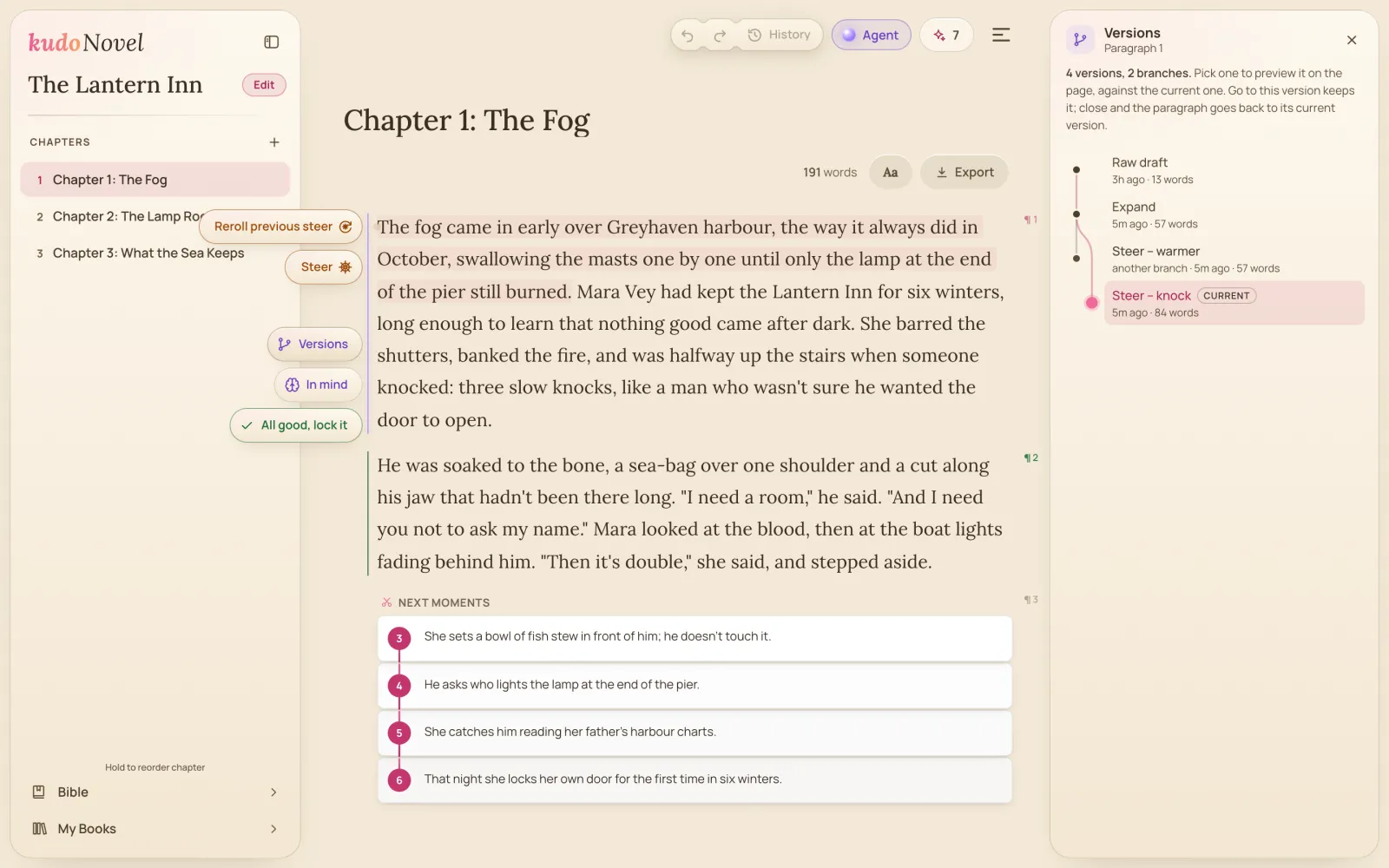
Go back, write something new, and the old path stays as its own branch, a click away. History shows every step of the chapter; each paragraph keeps a map of its versions to preview right on the page. Explore as many paths as you like, saved to your account, on every device, free.

Where: History sits beside Undo and Redo at the top of the page; Versions of this paragraph at the foot of its margin.
KudoNovel's Versions panel beside the page: a paragraph's raw draft, its Expand, a steer on one branch and another steer on a second branch, the current one highlighted

KudoNovel, the browser app for writing novels with AI, today set out the design behind its editor: the simplest, cleanest page it could build, with colour-coded buttons right where the writer needs them, an editor writers shape to their own habits, a story Bible they brainstorm with like a friend, and an undo that keeps every path.

AI writing tools tend to add a panel with every feature, until the story is the smallest thing on screen. KudoNovel went the other way. The page is the whole screen, and only the paragraph being written shows its tools, each colour-coded so a new writer knows what it does within seconds.

The best design is the one you can’t see. Writers should see their story, and find the button they need exactly where their eyes already are.

An editor that fits the writer

Steer edits a paragraph, or just the part the writer highlights, from a one-line instruction. Its quick buttons make common edits one tap, and with Customize writers turn their own instructions into up to five buttons of their own, saved to the account for every book.

Brainstorm like talking to a friend

The story Bible keeps itself up to date as the book grows. Its Ask is a plain chat: it answers questions about the book, offers ideas that fit what is written, and brainstorms when the writer talks the story through, turning what they decide into Bible changes they confirm one by one.

Undo, done right

Going back never deletes: a new idea after an undo starts a branch, and the old path stays a click away. Each paragraph keeps a map of its versions, and the chapter a history of every step, saved to the writer’s account. Free.

Availability

Everything here is available today at kudonovel.com, on a phone, a tablet or a computer, in all 22 of the app’s languages. More in Features.
Questions

Your questions, answered

Can I make my own Steer buttons?

Yes. Open the Steer box, press Customize, and write a name and an instruction. Up to five of your own sit on the row beside Tighten and Heat, on every book and every device.

Can I brainstorm with the story Bible?

Yes. Open the Bible and press Ask. Ask about your book, ask for ideas, or tell it your story: it asks about what isn’t settled and proposes Bible changes you apply or skip one by one.

Can I get an older version of a paragraph back?

Yes. Every Expand and Steer is a version on the paragraph’s map, branches included. Undo and Redo above the page walk the whole chapter, and History lists every step. Saved to your account, no credits.

Where do I start?

On a blank page. Type a rough line, press Expand in the margin, and KudoAI writes it out in your words.

More from the newsroom

All releases →
The KudoNovel letter

Be first to read the next chapter.

Press releases and product updates from KudoNovel, straight to your inbox — for writers, reviewers and anyone covering AI and fiction.

  • New features the day they ship, with the demo
  • Notes on how we build KudoAI, in plain words
  • Early looks before the press release goes out
Send me

About once a month. No spam, never sold. One-click unsubscribe in every email. See our privacy policy.

k

You’re subscribed.

You’re subscribed to our mailing list. You should receive a confirmation email at .

Use a different email

Just you, and your story.

Sign up free. The buttons you need will be right there.

Start writing free